Boosting Website Speed and Performance With Wordpress
Enhancing your WordPress website's speed and performance is essential for user satisfaction and search engine optimization. Slow-loading sites can lead to frustrated users, increased bounce rates, and lower search engine rankings. To address these issues effectively, it is important to first identify the factors contributing to delays. Key strategies include selecting the right hosting provider, efficiently managing plugins, and optimizing images. But where should you start, and which steps are crucial to ensure your site runs efficiently? Let's explore the most important actions to take.
Importance of Website Speed
In today's digital landscape, website speed is a necessity, not a luxury. It directly impacts your site's visibility, traffic, and overall performance. Google ranks pages partly based on load speed, meaning slower sites risk lower search engine rankings. Fast loading times boost your site's position and enhance user experience. A load time exceeding three seconds can lead to a 40% abandonment rate, underscoring the importance of quick page loads to retain visitors.
Improving your site's speed can significantly increase conversion rates. Reducing load time by even one second can enhance conversions by up to 17%. To achieve this, focus on optimizing your WordPress performance. Start by compressing and optimizing images, which can drastically reduce load times. Additionally, using a caching plugin to store static versions of your content can expedite page delivery.
Given that the average human attention span is just 8.25 seconds, capturing visitor interest quickly is critical. Websites that load in two seconds or less enjoy higher user satisfaction and engagement. Prioritizing website speed will keep you competitive and ensure a positive user experience.
Common Causes of Slow Websites
When your WordPress site loads slowly, common causes include unoptimized high-resolution images, excessive plugin usage, and inefficient code execution. Large images can significantly increase load times, while too many plugins can degrade performance. Additionally, inefficient code from themes or customizations can strain your server, leading to delays.
Unoptimized High-Resolution Images
High-resolution images often cause sluggish website performance when not optimized properly. Unoptimized images can significantly increase page loading times, leading to user frustration and higher bounce rates. Research indicates that 40% of users abandon sites that take longer than three seconds to load. Large image files inflate total page sizes, negatively impacting your site's performance and search engine rankings, as Google prioritizes speed.
Compressing images before uploading them to your WordPress site can reduce file sizes by up to 80%, enhancing load times and user experience. Implementing responsive images ensures the appropriate image size is served based on the user's device, which is crucial for mobile users where speed is vital.
Regular audits of your media library can help identify and optimize oversized images, preventing site slowdowns and maintaining optimal loading speeds. Improved loading speeds can lead to conversion rates increasing by as much as 17% for every second reduced. By effectively managing your images, you not only enhance user satisfaction but also boost your site's performance and conversion rates, ultimately creating a more efficient and user-friendly website.
Excessive Plugin Usage
Optimizing high-resolution images is crucial for speeding up your WordPress site, but managing plugin usage is equally important. Excessive plugin usage can slow down your website because each plugin adds extra code that the server must process, increasing loading times. Additionally, poorly coded or outdated plugins can degrade performance, introduce security vulnerabilities, and cause compatibility issues.
Studies indicate that having too many plugins can increase page loading time by up to 50%. Therefore, it is essential to limit your plugins to those that provide fundamental functionalities. Regularly auditing your plugins is a best practice in WordPress speed optimization. Removing unused plugins can significantly enhance site speed, with some users reporting performance improvements of up to 70% after decluttering their plugin list.
To manage your plugins effectively, deactivate and test them individually to identify any that negatively impact site performance. This method allows you to make informed decisions about which plugins to keep or remove, thereby improving your site speed. A leaner, well-maintained plugin list contributes to a faster and more efficient website.
Inefficient Code Execution
Inefficient code execution is a significant factor behind sluggish website performance. This often results from poorly coded themes or customizations that burden your server, leading to extended loading times. Additionally, the use of excessive or unoptimized plugins introduces unnecessary code that further hampers performance. Each plugin contributes to the load, increasing execution times.
Rendering-blocking JavaScript is another frequent issue. It delays the loading of essential content, frustrating visitors and potentially driving them away. Similarly, heavy reliance on external scripts and resources can slow down execution due to increased HTTP requests and potential latency from third-party servers.
To mitigate these issues, regularly auditing and optimizing your code is essential. Focus on removing unused scripts and minifying CSS/JavaScript files to streamline your codebase. This can significantly enhance loading speeds and overall website performance. By addressing inefficient code execution, you'll create a faster, more efficient website that offers a superior user experience. A well-optimized site not only ranks higher in search engines but also keeps visitors engaged and encourages return visits.
Choosing the Right Hosting
Choosing the right hosting is crucial for your WordPress site's speed and performance. Managed WordPress hosting offers optimized configurations and performance enhancements, while dedicated or VPS hosting ensures better resource allocation for high-traffic websites. Additionally, selecting a provider with integrated caching solutions and data centers close to your target audience can significantly improve loading times.
Types of Hosting
Selecting the right type of hosting is crucial for the speed and performance of your WordPress website. Let's examine the main types of hosting available:
- Shared Hosting: The most affordable option, but it may lead to slower speeds due to resource competition with other sites on the same server, particularly during peak traffic times.
- Managed WordPress Hosting: Specifically tailored for WordPress, this hosting offers faster load times, automatic updates, and enhanced security features. Quality providers often utilize advanced caching technologies, significantly boosting website speed and performance.
- VPS Hosting: Virtual Private Server hosting provides dedicated resources and greater control compared to shared hosting, resulting in better performance and stability. It's an excellent choice for growing websites that require more reliable speed and performance.
- Dedicated Hosting: For peak performance, dedicated hosting offers exclusive server resources, ensuring superior speed and reliability. High-traffic websites benefit from this setup as it minimizes resource competition and maximizes performance.
Choosing the right type of hosting and a reputable provider can lead to substantial improvements in your WordPress website's speed and performance, ensuring an optimal user experience.
Resource Allocation
Optimal resource allocation is crucial for maximizing your WordPress website's speed and performance. Selecting the right hosting provider significantly impacts your site speed. Managed WordPress hosting offers optimized server configurations and automatic updates, which can enhance your site speed by up to 68%.
Shared hosting may seem cost-effective but often results in slower website performance due to resource competition with other sites on the same server. In contrast, dedicated hosting provides exclusive resources, ensuring faster performance. Hosting providers like WP Engine and Bluehost offer integrated caching solutions that serve cached pages, significantly improving website performance.
The choice between shared, VPS, and dedicated hosting directly affects your loading times. Dedicated servers generally provide the fastest performance due to exclusive resource allocation, which is essential during high-traffic periods. Regularly researching and choosing a hosting provider that specializes in WordPress can prevent slowdowns and ensure optimal site speed. By making informed decisions on resource allocation, you can keep your WordPress site running smoothly and efficiently.
Performance Enhancements
Enhancing your WordPress site's performance starts with selecting the right hosting provider. A reliable hosting solution is crucial for optimizing site speed and overall WordPress performance. Managed WordPress hosting options, such as WP Engine, offer server configurations specifically tailored for WordPress, resulting in faster loading times and better resource management. In contrast to shared hosting, which suffers from resource competition, dedicated hosting provides exclusive server resources, thus enhancing site speed and uptime.
Choosing hosting providers that offer integrated caching solutions, like SiteGround, can further improve your site's performance. Transitioning from shared hosting to more robust options can result in significant speed improvements. For instance, WP Engine users report an average speed increase of 68%.
When selecting a hosting provider, consider the following:
- Managed WordPress Hosting: Delivers optimized server environments, improving performance and reducing load times.
- Dedicated Hosting: Allocates exclusive server resources, mitigating common performance issues associated with shared hosting.
- Integrated Caching Solutions: Providers like SiteGround offer caching features that enhance site speed and user experience.
Optimizing Images
Prioritizing image optimization is essential for achieving faster website loading times. Unoptimized images can significantly slow down a website, increase page sizes, and elevate bounce rates, particularly on mobile devices. Utilizing image compression tools can reduce file sizes without noticeable quality loss, resulting in quicker load times and an enhanced user experience.
Implementing responsive images can further boost site speed. This technique delivers different image resolutions based on the user's device, optimizing performance across various screen sizes. Regularly audit your image library to remove unused files and ensure the use of appropriate formats—JPEG for photographs and PNG for graphics.
Another effective strategy is lazy loading images, which delays the loading of off-screen images until they are needed. This enhances initial page load times and reduces server load by only loading visible content. By focusing on these strategies, you can significantly improve your site's performance.
Managing Plugins Efficiently
After optimizing your images for faster website speed, it is equally crucial to manage your plugins efficiently to sustain high-quality performance. Regularly auditing your installed plugins helps you identify and remove those that are unused, which can significantly slow down your WordPress site. Reducing the number of unnecessary plugins will result in a noticeable improvement in site performance.
Opt for well-coded plugins to enhance performance. Poorly coded plugins can create inefficiencies that negatively impact loading speeds. To ensure you're not using plugins that cause slowdowns, deactivate and test them one at a time. This process allows you to identify and eliminate plugins that degrade your site's performance.
Here's how to manage plugins efficiently:
- Regular Audits: Routinely check for and remove unused plugins.
- Quality over Quantity: Choose well-coded plugins that are optimized for performance.
- Impact Testing: Deactivate and test plugins individually to assess their impact on site performance.
Additionally, consider using caching plugins like WP Super Cache. These tools enhance loading speeds by serving cached versions of your pages, thereby reducing the need for repeated database queries.
Proper plugin management is essential for maintaining optimal WordPress site performance, ensuring your visitors enjoy a fast and seamless experience.
Utilizing Caching Solutions
Leveraging caching solutions is transformative for enhancing your WordPress site's speed and performance. Tools like WP Rocket and WP Super Cache can accelerate your site by 2x to 5x by serving static pages rather than dynamically generating them for each visit. This significantly reduces loading times, offering users a faster page load experience every time they visit.
By minimizing database queries, caching reduces server load, enabling smooth performance even during high traffic periods. This not only enhances user experience but also positively impacts SEO rankings, as Google considers site speed a crucial ranking factor. Faster pages can lead to better engagement and lower bounce rates, further boosting your site's overall performance.
Implementing WP Rocket or WP Super Cache automates the caching process, allowing you to reap these benefits without extensive technical knowledge. Regularly clearing the cache ensures that users receive the most up-to-date content while still benefiting from speed improvements. These caching solutions optimize your WordPress site for both performance and user satisfaction, making it a win-win scenario.
Leveraging Content Delivery Networks
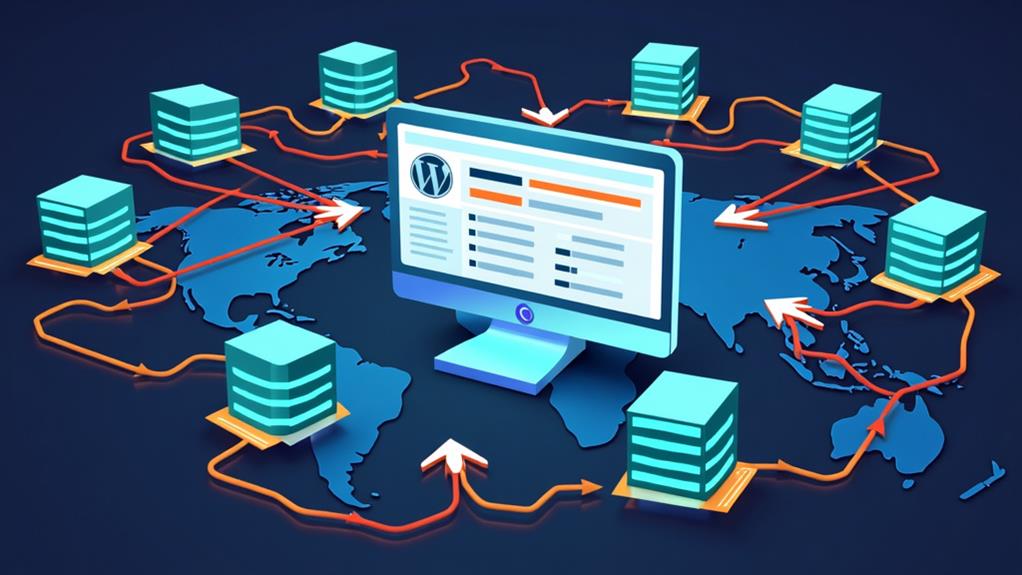
A Content Delivery Network (CDN) can significantly enhance your WordPress site's performance by distributing its content across multiple servers globally. By serving content from the server closest to each user, a CDN reduces latency and improves loading times, ensuring your website remains fast and delivers a superior user experience.
Integrating a CDN with WordPress is straightforward, thanks to numerous plugins that automate the setup process. This integration optimizes content delivery seamlessly, helping you maintain high performance. Here's how a CDN can benefit your WordPress site:
- Faster Load Times: Achieve up to a 50% reduction in loading times, ensuring users access your content quickly, regardless of their location.
- Improved Site Reliability: During traffic spikes, a CDN distributes the load across multiple servers, preventing any single server from becoming overwhelmed.
- Enhanced Security: Many CDN providers offer features such as DDoS protection and web application firewalls, safeguarding your site while enhancing performance.
Regular Maintenance and Updates
Maintaining your WordPress site's performance and security relies heavily on regular upkeep and updates. Consistently updating the WordPress core, themes, and plugins is crucial to ensure your site remains secure and functions smoothly. Outdated plugins can create security vulnerabilities and inefficiencies, so routinely checking for updates is essential. This practice not only ensures compatibility with the latest web standards but also enhances site speed.
Regular database clean-ups are equally important. Removing spam comments and unused plugins reduces bloat, directly improving your site's speed and responsiveness. A streamlined database means your server processes less data, resulting in faster loading times and a better user experience.
Additionally, engage in performance monitoring using tools like Google PageSpeed Insights. These tools help identify areas needing improvement, ensuring your site remains fast and user-friendly. By consistently updating and optimizing your site, you protect against potential slowdowns and enhance overall functionality.